Pages

Sunday, November 7, 2010

Compare/Differentiate/Merge different files and folders : KDiff3

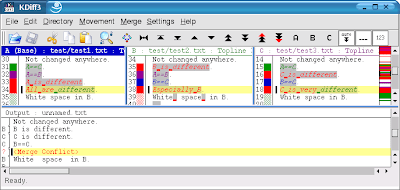
KDiff3 is a program that :
  • compares or merges two or three text input files or directories.
  • shows the differences line by line and character by character (!).
  • provides an automatic merge-facility and
  • an integrated editor for comfortable solving of merge-conflicts.
  • supports Unicode, UTF-8 and other codecs, autodetection via byte-order-mark "BOM"
  • supports KIO on KDE (allows accessing ftp, sftp, fish, smb etc.).
  • Printing of differences.
  • Manual alignment of lines.
  • Automatic merging of version control history .
  • and has an intuitive graphical user interface.
  • Windows-Explorer integration Diff-Ext-for-KDiff3 - shell extension included in installer
  • KDE-Konqueror service menu plugin.
  • Simplified integration with IBM-Rational-Clearcase for Windows.
  • Read what else is special in a short abstract (PDF). 
  • Comfortable Merge Of Two Or Three Input Files .
  • Line-By-Line And Char-By-Char Diff-Viewer 
  • See White-Space Differences At One Glance.
  • Analyze three files and see where they differ.
Supported platforms:
  • GNU/Linux with KDE3
  • MS-Windows
  • Apple Mac OSX binary available
  • In theory any platform for which Qt-libs work
 learn more and free download KDiff3.

Type Faster with a Open Source Software : LetMeType

LetMeType works independently of the program you enter the text into - be it a word processor, the editor of a development environment or a dialog box field.
LetMeType can be used for arbitrary Western languages and even in mixed language environments. It works best for long words or phrases that are frequently typed. Therefore it is best suited for software developers and people who use a lot of technical terms. (Which is not to say that people who just write informal email will not find it useful.)
LetMeType's behaviour is highly customizable. You can set the maximum number of suggestions and their frequency. For skilled keyboard artists it is possible to limit the suggestions to long words with a high probability, while others can gradually increase the number of suggestions. Unobtrusiveness is important for both groups. The window containing the suggestions is displayed and removed quickly, and you can always ignore it and continue typing.
Two other important aspects are privacy and security. LetMeType only stores single words, but no continous texts. There also is a secure way to prevent passwords entered into other programs from being monitored and stored by LetMeType.

To finish the currently typed word, you just have to press the key 1. Every other key would make the suggestion disappear and would be processed by the text editor as if LetMeType was non-existent.

The main window lists the vocabulary and allows you to configure LetMeType using the various menu items.
Learn more and free download  LetMeType.

Write sticky notes on the desktop with a open source software : ATnotes

ATnotes is a FREE program which creates notes on the desktop. It lives in the system tray, takes very few resources, and supports a lot of languages.

Don't lose your notes anymore . With ATnotes, you will never miss important events or lose information. You can organize your notes by using folders, set alarm, change color or font and send your note to your colleagues.

Features :

  • dragable and resizeable notes anywhere on the desktop
  • notes are autosizing as text is entered
  • custom font, background color, text color and border color for each note
  • single or repeated alarms for each note with visual and audio alarm signal
  • hide notes until manually activated or until a specified date/time
  • minimize notes to the first line of text and restore the note size to fit the whole text
  • open URLs, e-mail adresses and file shortcuts in notes with the associated program
  • get an overview of all current notes in the note list
  • search for notes containing a specified text
  • user defined system-wide hotkeys for important functions
  • send notes to other computers in a local network
  • user interface can be translated into any language 

  You can already download it and learn more about ATnotes .

Open Source Password Protect for d Text file : Steganos LockNote

Encrypts everything that’s important to you, on laptops, PCs, USB sticks, CDs and DVDs.
Steganos LockNote will change the way you work with confidential notes.

Application and document in one: the mechanism to encrypt and decrypt a note is part of it. Secure, simple, independent. No installation required.
System requirements: Windows 2000, Windows XP, Windows Vista, Windows 7.


Why use Steganos LockNote?

  • Store your most valuable notes as a LockNote
    Hide your serial numbers, passwords, phone numbers and everyday notes in a safe place. Your informations will be encrypted using a password and most modern AES 256bit encryption technology.
  • Secure, yet simple
    Just double-click a LockNote and enter your password to access your text files as usual.
  • No installation required
    Move LockNotes wherever you want, as often as you want. A LockNote document does not require much more hard drive space than an unencrypted document.
  • Encrypt existing text files in no time at all
    Simply drag and drop existing text files on a LockNote window: they will be encrypted automatically.
  • Open and free
    LockNote is open source and is based upon open source technologies, e.g. the certified CryptoPP program library for strong encryption. Learn more and free download 
    Steganos LockNote.

Open Source Create, Edit and Encrypt PDF files : Pdf995, PdfEdit995 and Signature995

The pdf995 suite of products - Pdf995, PdfEdit995, and Signature995 - is a complete solution for your document publishing needs. It provides ease of use, flexibility in format, and industry-standard security- and all at no cost to you.

Pdf995 makes it easy and affordable to create professional-quality documents in the popular PDF file format. Its easy-to-use interface helps you to create PDF files by simply selecting the "print" command from any application, creating documents which can be viewed on any computer with a PDF viewer. Pdf995 supports network file saving, shared printing, Citrix/Terminal Server, custom page sizes and large format printing. Pdf995 is a printer driver that works with any Postscript to PDF converter. The pdf995 printer driver and a free Converter are available for easy download.
Learn more and free download  Pdf995.
PdfEdit995 offers a wealth of additional functionality, such as: combining documents into a single PDF; automatic link insertion; hierarchical bookmark insertion; PDF conversion to formatted HTML or DOC (text only); integration with Word toolbar with automatic table of contents and link generation; autoattach to email; stationery and stamping
Learn more and free download  PdfEdit995.

Signature995 is part of a suite of PDF-related products from pdf995. Together they allow you to create, customize, and securely transmit PDF documents quickly, affordably, and easily. Signature995 is available as a free download.
Also available is our Standard Encryption Module. Standard Encryption uses native PDF encryption to restrict users from printing, copying text and images and modifying PDF files. It can also password protect PDF files. 
Signature995 uses native PDF encryption, offering a high level of protection for all your Internet communications, including legal documents and financial transactions. Signature995 employs Microsoft digital certificate technologies to create and validate digital signatures. It is both powerful and easy to use. Signature995 supports PDF documents (*.pdf), Microsoft Office documents (*.doc, *.xls, *.ppt) and Zip archives (*.zip) and UltraPdf documents (*.updf).
Learn more and free download Signature995.

Control iTunes in Firefox : FoxyTunes

Do you listen to music while surfing the Web?
Now you can control your favorite media player without ever leaving your Firefox and more...
FoxyTunes is a powerful browser add-on. Control the music playing in your favorite media player as you surf the web. No more switching back and forth between iTunes and your browser.
 
Basic features :
  • Tiny, unobtrusive and customizable
  • Multiplatform - works on MS Windows, Linux and Mac OS X
  • Supports more than 30 media players, will support more players in future versions
  • Also supports Mozilla Thunderbird, SeaMonkey and Flock
  • Position anywhere in the browser - on the status bar or on one of the toolbars
  • Volume controls
  • Seek Slider
  • Configurable keyboard shortcuts
  • Currently playing track information
  • Customizable and collapsible
  • Auto-hide
  • Skinnable and localizable.
  • Automatically launch your player when needed
  • Pop up and hide the player window with a click
  • Correctly shows track information encoded in any language, supports Unicode
  • Alarm Clock and Sleep Timer
  • No third-party controller applications and plugins - everything is done efficiently by the FoxyTunes extension 

 Advanced features :
  • Built-in Signatunes - music signatures for email, blog and forums
  • Automatically finds and displays album covers
  • Music Web searches - lyrics, images, info, video and much more
  • FoxyTunes Mini desktop widget with its own tabbed mini browser
  • Shows recently played song history
  • Stream podcasts directly from the Web to your media player
  • Subscribe to podcasts (only with supporting players)
  • Stream media files (mp3's, m3u's etc.) directly from the Web to your media player
  • Optional extra - TwittyTunes - post your currently playing songs to Twitter with a click 

 Learn more and download FoxyTunes.

Open Source Burn an audio CD : jCDWriter

jCDWriter is a free software for recording CDs on Linux (works on Windows also if you do not mind doing some tweaks to get cdrecord and mkisofs working). jCDWriter depends on 'cdrecord' and 'mkisofs' in the background. It is written in Java so it also requires JRE to be installed. I will try my best to keep this document up-to-date and useful.
free software


Features :

- Can create custom CD-R(W) using drag-n-drop style user interface.

- Create custom directories and drag files/folders into them.

- Save and load your CD layout.

- Scan your CD-Recorders at click of a button.

- Create CD images in the popular .iso format. Which you can mount as a local file system by doing 'mount -o loop /mnt/iso mycd.iso'.

- Burn your favorite downloaded Linux distributions to a CD or ISO images you created using jCDWriter..

- Can burn directly to a CD-R(W).

- Can erase CD-RW disks.

Learn more and free download jcdwriter.

Saturday, October 30, 2010

Open source cut /edit /mix /record /remix sound files : Audacity

Audacity® is free, open source software for recording and editing sounds. It is available for Mac OS X, Microsoft Windows, GNU/Linux, and other operating systems.
free audio editor

Audacity is a free, easy-to-use and multilingual audio editor and recorder for Windows, Mac OS X, GNU/Linux and other operating systems. You can use Audacity to:
  • Record live audio.
  • Convert tapes and records into digital recordings or CDs.
  • Edit Ogg Vorbis, MP3, WAV or AIFF sound files.
  • Cut, copy, splice or mix sounds together.
  • Change the speed or pitch of a recording.
free audio editor

Recording

Audacity can record live audio through a microphone or mixer, or digitize recordings from cassette tapes, vinyl records, or minidiscs. With some sound cards, it can also capture streaming audio.
  • Record from microphone, line input, or other sources.
  • Dub over existing tracks to create multi-track recordings.
  • Record up to 16 channels at once (requires multi-channel hardware).
  • Level meters can monitor volume levels before, during, and after recording.

Import and Export

Import sound files, edit them, and combine them with other files or new recordings. Export your recordings in several common file formats.
  • Import and export WAV, AIFF, AU, and Ogg Vorbis files.
  • Import MPEG audio (including MP2 and MP3 files) with libmad.
  • Export MP3s with the optional LAME encoder library.
  • Create WAV or AIFF files suitable for burning to CD.
  • Import and export all file formats supported by libsndfile.
  • Open raw (headerless) audio files using the “Import Raw” command.
  • Note: Audacity does not currently support WMA, AAC, or most other proprietary or restricted file formats.

Editing

  • Easy editing with Cut, Copy, Paste, and Delete.
  • Use unlimited Undo (and Redo) to go back any number of steps.
  • Very fast editing of large files.
  • Edit and mix an unlimited number of tracks.
  • Use the Drawing tool to alter individual sample points.
  • Fade the volume up or down smoothly with the Envelope tool.

Effects

  • Change the pitch without altering the tempo, or vice-versa.
  • Remove static, hiss, hum, or other constant background noises.
  • Alter frequencies with Equalization, FFT Filter, and Bass Boost effects.
  • Adjust volumes with Compressor, Amplify, and Normalize effects.
  • Other built-in effects include:
    • Echo
    • Phaser
    • Wahwah
    • Reverse

Sound Quality

  • Record and edit 16-bit, 24-bit, and 32-bit (floating point) samples.
  • Record at up to 96 kHz.
  • Sample rates and formats are converted using high-quality resampling and dithering.
  • Mix tracks with different sample rates or formats, and Audacity will convert them automatically in realtime.

Plug-Ins

  • Add new effects with LADSPA plug-ins.
  • Audacity includes some sample plug-ins by Steve Harris.
  • Load VST plug-ins for Windows and Mac, with the optional VST Enabler.
  • Write new effects with the built-in Nyquist programming language.

Analysis

  • Spectrogram mode for visualizing frequencies.
  • “Plot Spectrum” command for detailed frequency analysis.

Free and Cross-Platform

  • Licensed under the GNU General Public License (GPL).
  • Runs on Mac OS X, Windows, and GNU/Linux.

Learn more and free download Audacity.

Open source burnning audio CD & DVD : Easy Burning

This program is freeware.EASY Burning is the easiest way to backup your files in a cdr(w). Integrated to the shell (send to) or used as a normal application, EASY Burning works with any CD writer. Write a folder and files, pictures and what ever you want. Easy to use. Create Data CD from a folder. Backup your MP3 collection. Integrated into Shell. send to Integrated into Desktop, Can write CD/DVD in the UDF format. Designed for Windows 98, Me, 2000, XP. Multissession, Multifolder, Multifile(s) support. Incl. Folder compare and Check-File. This program have an independant internal ASPI/SPTI detection. Multilanguage file (english, german, french, finnish, spanish, danish, portuguese, hungarian, galician, macedonian, polish, catalan, italian, russian, japanese, nederlands, ukrainian, SimpChinese, korean, chinese_taiwan, serbian, Serbian ASCII, Serbian cyryllic, Serbian latin), turkish, Brazilian Portuguese and swedish. Inclusive VisualISO for multi file and folder. Now include Verify file after burn. Burn Video DVD (DVD Version only).
free software burning cd

Learn and free download Easy Burning.

Open source add ecommerce to website : osCommerce

 osCommerce is the leading Open Source online shop e-commerce solution that is powered by a dedicated, strong, and ever growing community, and is released under the GNU General Public License.
free software ecommerce

osCommerce has attracted a large growing e-commerce community that consists of over 239,500 store owners and developers who support each other and extend osCommerce Online Merchant with add-ons being contributed on a daily basis. To date there are over 6,100 add-ons that are available for free to customize osCommerce Online Merchant online stores and to help increase sales.
osCommerce Online Merchant is an Open Source online shop e-commerce solution that is available for free under the GNU General Public License. It features a rich set of out-of-the-box online shopping cart functionality that allows store owners to setup, run, and maintain online stores with minimum effort and with no costs, fees, or limitations involved.
free software ecommerce
With over 8 years of operation, osCommerce has built a showcase of over 12,700 online shops that have been voluntarily added to the live shops section, and powers many thousands of more online shops worldwide.
free software ecommerce
Learn more and free download osCommerce.

Open software manage passwords : PINs

PINs is a free feature-rich Windows program for safe and comfortable storing of any secure information like passwords, accounts, PINs etc. PINs uses a secure 448 bit Blowfish algorithm to ensure the data are not crackable. The password used for securing access to stored data is not saved anywhere.
PINs does not require installation and does not need any special dlls, drivers or system files which can mess up your system. This means that PINs can run directly from floppy - including data files - without installing anything. This is extremely useful if you wish to easily access your data on other computers as well.
PINs is OSI Certified Open Source Software. It's freeware.
free software


 Features:
  • Secure 448 bit Blowfish encoding.
  • Unlimited number of entries and data files.
  • A clear tree-like data organization which allows logical grouping of systems and accounts.
  • Automated login into Internet services (SuperPaste).
  • A powerful random passwords generator.
  • Safe files wiping using Gutmann, DoD and custom methods.
  • Embedded hyperlinks launching.
  • Unlimited in size, multi-line descriptions.
  • A flexible data import/export in text format.
  • Multiple user accounts on a single PC.
  • Accounts sorting using any column as a sort criteria.
  • Comfortable accounts adding, editing, and deleting.
  • Compatibility with popular clipboard extenders.
  • Passwords masking.
  • Copy logins and passwords to the Windows clipboard.
  • Find/find next functions.
  • Expired passwords tracking.
  • Running from a floppy without saving settings to registry.
  • Multilingual versions.
  • Full source code available.
Learn more and free download PINs.

    Open source manage business financial accounts : SQL-Ledger

    SQL-Ledger® is a double entry accounting system. Accounting data is stored in a SQL database server, for the display any text or GUI browser can be used.
    SQL-Ledger is platform independant and runs on any *NIX, Mac or Windows computer.
    SQL-Ledger can be accessed remotely so people can be in different parts of a city, country or across the world.
    free software

    The assembly feature can be used to build manufactured goods from parts, services, labor units and assemblies. When the assembly is sold all the accounts linked to the individual items are updated and stock levels adjusted accordingly.
    Templates for invoices, orders, income statements, etc. can be modified to suit. SQL-Ledger can also be used with LaTeX to produce PDF or postscript.
    Documents can be sent to a printer, file or fax, emailed or displayed on screen.
    free software


    Features :
    • Accounts Receivable
    • Accounts Payable
    • Voucher System
    • General Ledger
    • Inventory Control
    • Billing / Invoicing
    • Early Payment Discounts
    • Time Cards
    • Recurring Invoices
    • POS
    • Check Printing
    • Purchase / Sales Orders
    • Customizable Taxes
    • Multi-user
    • Multi-company
    • Audit Control
    • Foreign Currency
    • Internationalization
    • Access Control
    • SQL server backend
    • Customizable Templates
    • Assemblies (BOM, kits)
    • Chart of Accounts
    • Customizable Reports
    • Financial Statements
    • Administration Module
    • Application Interface
    • Backup to file/email
    • Import payment transactions from banks
    • Import from CSV files
    • Use on Handheld
    • Generate control digits for invoices 
    Learn more about SQL Ledger.

      Friday, October 29, 2010

      Open Source Virtual Desktop in windows

      Virtual Desktop will create new desktops for you and let you to switch between desks and windows quick and easy. This project consist in two applications: one NT service which manage desktops and another wich create desktops. Service requires 2MB RAM.
      free software virtual desktop

      How to use it:
      • Lunch DesktopLoader - this program will install and start the Desktop service and create 3 new desktops.
        Note: you will do this once because DesktopLoader will start itself each time at windows startup.
      • You can switch between desktops using Alt+1, Alt+2, Alt+3 or Alt+4.
      How to uninstall it:
      • Lunch uninstall.bat from Program Files/Free-Soft/Virtual Desktop/
      License agreement:
      • This software is freeware and comes with full Delphi source codes.
      • You can not use the sources in commercial programs without the author permission.
      • The author is not responsible or liable for any system, hardware or software errors/malfunctions which may occur during the use of this program.
       Learn more about Virtual Desktop and free download.

      Open source display a desktop calendar : Sunbird from Mozilla

      Mozilla Sunbird® is a cross-platform calendar application, built upon Mozilla Toolkit. Our goal is to provide you with a full-featured and easy to use calendar application that you can use around the world.
      Lightning is a popular calendaring, scheduling and task management extension. Mozilla Sunbird® is a cross-platform application that brings Mozilla-style ease-of-use to your calendar.
      Sunbird is available for :
      • Windows, English
      • Linux x86, English
      • Linux x86-64, English
      • Mac OS X, English
      • Other Languages
      free software calendare sunbird

        Sunbird System Requirements :

        Windows

        Operating Systems
        • Windows XP (Recommended)
        • Windows Server 2003
        • Windows Vista
        • Windows 7
        • Windows 20001
        Minimum Hardware
        • Pentium 233 MHz (Recommended: Pentium III 500MHz or greater)
        • Windows 7, Windows Vista, Windows XP: 786 MB RAM (Recommended: 1GB RAM or greater)
        • 10 MB hard drive space

        Mac OS X

        Operating Systems
        Mac OS X 10.4.x and later
        Minimum Hardware
        • Macintosh computer with an Intel x86 or PowerPC G3, G4, or G5 processor
        • 256 MB RAM (Recommended: 512 MB RAM or greater)
        • 10 MB hard drive space

        Linux

        Software Requirements
        Please note that Linux distributors may provide packages for your distribution which have different requirements.
        • Linux kernel - 2.2.14 or higher with the following libraries or packages:
          • glibc 2.3.2 or higher
          • XFree86-3.3.6 or higher
          • gtk+2.0 or higher
          • fontconfig (also known as xft)
        Minimum Hardware
        • Intel Pentium II or AMD K6-III+ 233 MHz CPU (Recommended: 500MHz or greater)
        • 64 MB RAM (Recommended: 128 MB RAM or greater)
        • 10 MB hard drive space
        Learn more about Sunbird and free download.

        Sunday, October 24, 2010

        Open source create/edit html file : Bluefish

        Bluefish is a powerful editor targeted towards programmers and webdesigners, with many options to write websites, scripts and programming code. Bluefish supports many programming and markup languages, and it focuses on editing dynamic and interactive websites.
        Bluefish has many features, this list will give you an overview of the most important or outstanding features in Bluefish 2.0. Not all features are available in Bluefish 1.0, and not all features are (yet) available on windows.


        Features:
        • Lightweight - Bluefish tries to be lean and clean, as far as possible given it is a GUI editor. Bluefish uses 30%-45% of the memory compared to other popular web development environments and starts within a second.
        • Fast - Bluefish starts really quick (even on a netbook) and loads hundreds of files within seconds.
        • A What You See Is What You Need interface
        • Multiple document interface, easily opens 500+ documents (tested >10000 documents simultaneously)
        • Project support, enables you to work efficiently on multiple projects, and automatically restores settings for each project.
        • Multi-threaded support for remote files using gvfs (depending on your gvfs setup, you'll have FTP, SFTP, HTTP, HTTPS, WebDAV, CIFS and more). 1
        • Very powerful search and replace, allowing POSIX and Perl Compatible regular expressions and sub-pattern replacing
        • Open files recursively based on filename patterns and/or content patterns
        • Snippets sidebar - specify custom dialogs, search and replace patterns or insert patterns and bind them to a shortkut key combination of your liking to speed up your development process
        • Integrate external programs such as make, lint, weblint, xmllint, tidy, javac, or your own program or script to handle advanced text processing or error detection.1
        • Integrate external filters of your liking, pipe your document (or just the current selected text) through sort, sed, awk or any custom script.1
        • Unlimited undo/redo functionality
        • In-line spell checker which is programing language aware (spell check comments and strings, but not code), requires libenchant during compilation.
        • Auto-recovery of changes in modified documents after a crash, kill or shutdown
        • Character map of all unicode characters (requires libgucharmap during compilation)
        • Upload / download synchronisation
        • Full screen editing
        • Many tools such as tabs to spaces, join lines, lines to columns, strip whitespace, etc. etc.
        • Customizable programming language support:
          • Code block folding
          • Highlighting matching block start and end markers (both brackets and tags)
          • Auto-completion and auto-tag-closing for many programming languages, with reference information, and even for nested languages (e.g. css inside html)with included language definition files for:
          • C/C++
          • CSS
          • CFML
          • gettext PO
          • HTML
          • Java
          • JavaScript
          • JSP
          • Perl
          • PHP
          • Python
          • Ruby
          • Shell
          • SQL
          • XML
        • Multiple encodings support. Bluefish works internally with UTF8, but can save your documents in any desired encoding.
        • Bookmarks functionality
        • HTML toolbar and tearable menu's
          • Nice wizards for HTML documents: tables, frames, and others
          • Dialogs for many HTML tags, with all their attributes
          • Fully featured image insert dialog
          • Thumbnail creation and automatically linking of the thumbnail with the original image
          • Multi thumbnail generation for easy creation of photo albums or screenshot pages
          • User-customizable toolbar for quick access to often used functions
        • Compliance with the Gnome and KDE user interface guidelines where possible
         Learn more about Bluefish Editor.

        Open source track time spent on a project : Time Stamp

        A free, open-source MS Windows program you can use to easily track time spent on a project. It enables you to time how long you spend on a task, including features that let you take "slack time" for a phone call or break. Times for various tasks can be linked to an hourly charge rate for accurate billing. Export your data using ASCII or XML, and customize your report for your own letterhead.

        Time Stamp will run on any current 32-bit Microsoft Windows environment (95, 98, 98SE, ME, NT 4, 2000, and XP).
        No Macintosh version is available, though Mac developers are invited to port Time Stamp by taking advantage of Time Stamp's Open Source Software license.


         Learn more about Time Stamp.

        Open Source ERP : WebERP

        webERP is an open-source web-based ERP system.
        webERP is a complete web based accounting/ERP system that requires only a web-browser and pdf reader to use. It has a wide range of features suitable for many businesses particularly distributed businesses in wholesale and distribution. It is developed as an open-source application and is available as a free download to use. The feature set is continually expanding as new businesses and developers adopt it.
        There are on average 5,000 downloads per month.

        The growth of webERP adoption has been entirely through word of mouth testimony - there has never been a marketing or advertising push to "sell" webERP. Of course there are no funds nor commercial incentive to do so for free software. Instead this growth is built on reputation and solid practical functionality that works as tried and tested by an increasing number of businesses.
        webERP can run on any web-server - Windows IIS, Apache or any web-server at all - it doesn't matter.
        Any device that has internet access can run webERP as a client - desktop, notebook netbook or phone all functionality is available.
        It is easy to develop functionality to meet precisely the requirements of your business. webERP developers are keen to work with your business to develop solutions you need.
        In labour markets where it is increasingly difficult to retain good staff this flexibility in where work is performed can be a key advantage to employers.
        It has translations to many different languages - each user can see the screens in their own language and in their own graphical theme.
        webERP is an Open Source project. As such there are no fees associated with using the system! What is more, there is competition between service providers to provide the best and most cost effective support. Service providers are more readily available because the availability of the source code enables those with PHP knowledge (the web-programming language used by webERP) to be able to identify exactly what processing is performed by the system. In proprietary systems this information is often not available even to licensed support providers - they need to communicate back to the software vendor for a response. With the information available to support people, the quality of the support is likely also to be better.
        Learn more about WebERP.

        Open Source Media Player : VLC

        The media player that fulfills all your needs. It handles DVDs, (S)VCDs, Audio CDs, web streams, TV cards and much more.

        With VLC, there is no need to continually update many different codec packs. VLC comes with nearly every codec built in!

        And whats more, VLC can play back your files, even if the media is damaged! Missing or broken pieces wont stop VLC. All the video and audio information that remains can be played.
        VLC is a media player, not converter, but if you're watching digital video, it's a must-have—plus VLC can indeed rip DVD's, as well as play ripped discs in ISO format (no actual optical media required.) VLC can also play FLV files downloaded from YouTube et al, no conversion to AVI required. Since there's a portable version, VLC's a nice choice for getting your DVD rips/saved YouTube video watching on wherever you go.
         Learn more about VLC.

        Saturday, October 23, 2010

        Open Source Convert a DVD to VCD or DivX : DVDx

        DVDx is likely the most popular DVD backup software world wide. Based on well known open source libraries, DVDx converts DVD movies in high qulaity (S)Video CD, DivX or Windows Media files.

        DVDx features:
        • copy DVD or convert MPEG1/2
        • preview before encoding
        • DVDx complies with NTSC and PAL video standard
        • audio track support
        • subtitle support
        • integrated help screens
        • extra features
        • MPEG expert features
        • multi-language support copy to Video CD
        • copy to Super VCD
        • copy to DivX
        • copy to AVI
        • copy to Windows Media Video 
        Learn more about DVDX.

        Open Source Play Multimedia Files : MPlayer

        MPlayer is a movie player which runs on many systems (see the documentation). It plays most MPEG/VOB, AVI, Ogg/OGM, VIVO, ASF/WMA/WMV, QT/MOV/MP4, RealMedia, Matroska, NUT, NuppelVideo, FLI, YUV4MPEG, FILM, RoQ, PVA files, supported by many native, XAnim, and Win32 DLL codecs. You can watch VideoCD, SVCD, DVD, 3ivx, DivX 3/4/5, WMV and even H.264 movies.

        Another great feature of MPlayer is the wide range of supported output drivers. It works with X11, Xv, DGA, OpenGL, SVGAlib, fbdev, AAlib, DirectFB, but you can use GGI, SDL (and this way all their drivers), VESA (on every VESA compatible card, even without X11!) and some low level card-specific drivers (for Matrox, 3Dfx and ATI), too! Most of them support software or hardware scaling, so you can enjoy movies in fullscreen. MPlayer supports displaying through some hardware MPEG decoder boards, such as the Siemens DVB, DXR2 and DXR3/Hollywood+.

        MPlayer has an onscreen display (OSD) for status information, nice big antialiased shaded subtitles and visual feedback for keyboard controls. European/ISO 8859-1,2 (Hungarian, English, Czech, etc), Cyrillic and Korean fonts are supported along with 12 subtitle formats (MicroDVD, SubRip, OGM, SubViewer, Sami, VPlayer, RT, SSA, AQTitle, JACOsub, PJS and our own: MPsub). DVD subtitles (SPU streams, VOBsub and Closed Captions) are supported as well.
        Learn more about MPlayer.